AddEmail ActiveX
Send HTML Emails with Images and Attachments
Overview

AddEmail enables your application to create and send text or HTML email messages with attachments and embedded images using SMTP protocol.
AddEmail works with all development environments that support COM objects, ActiveX or OCX controls, such as C# 2002-2022, VB.NET 2002-2022, ASP.NET, Visual Basic (VB5 and VB6), Visual C++, ASP, Access, Excel, Delphi, PowerBuilder, FoxPro etc.
AddEmail supports all 64-bit (x64) and 32-bit (x86) versions of Windows including Windows 11, Windows 10, Windows 8, Windows Server (all versions), Windows 7, Windows Vista, Windows XP and Windows 2000.

Why Choose AddEmail?

AddEmail has several features that you can not find anywhere else:
- It takes only 3 lines of code to send HTML email with attachments using AddEmail. With other controls or .NET classes you will need 20+ lines of code to accomplish the same task.
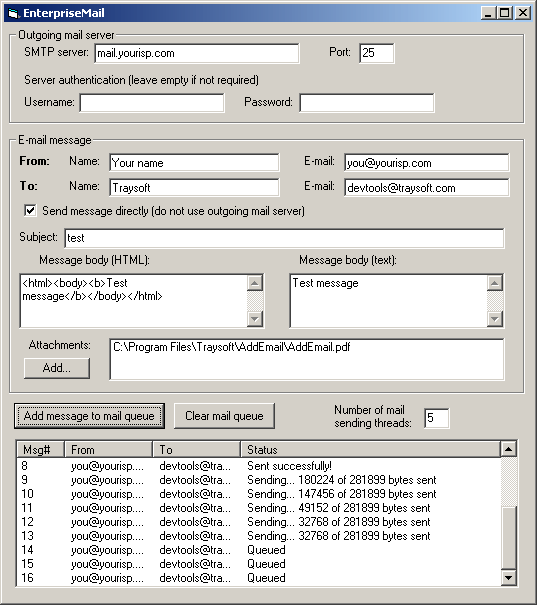
- AddEmail can send emails asynchronously without blocking your application. Your application can add a large number of emails to the queue and continue working while AddEmail sends emails in the background.
- AddEmail can send several emails simultaneously (Enterprise version only).
- With AddEmail you can import HTML file with embedded images in just one line of code. AddEmail automatically creates HTML email and attaches all images referenced in the HTML.
- AddEmail provides progress indication events when sending emails.
- AddEmail can send emails directly to recipients' mail servers without using your SMTP server (Enterprise version only).

You don't need any knowledge of SMTP, MIME or other Internet protocols to send emails using AddEmail. Whether you need to develop enterprise email solution or just want to add simple email notifications, you will start using AddEmail in minutes.

AddEmail was developed for today's most demanding applications and was thoroughly tested to ensure enterprise-level reliability and stability.

With our extensive user manual and large collection of samples you will always know how to complete your task. And if you have any questions, our knowledgeable support staff is only one click away.

Our clients include United States Department of Agriculture, Hewlett-Packard Canada, Edelweiss Air, Florida Department of Education and many more.
Features

Supports SMTP and ESMTP protocols
AddEmail sends emails using SMTP/ESMTP protocols with optional encryption (SSL/TLS) supported by all internet mail servers. AddEmail supports authentication and allows your application to specify username and password if required by your mail server. AddEmail was tested with many popular SMTP servers to ensure the highest compatibility.

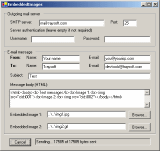
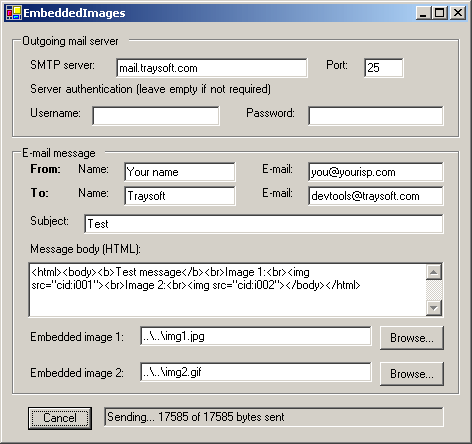
Supports HTML emails with embedded images
AddEmail makes it easy to create high-impact HTML emails with embedded images. Email recipients don't have to wait until images load from the web. You can include all images in the email to create professional-looking messages.

Supports HTML and text emails
AddEmail allows your application to create and send text or HTML emails. HTML emails can have text-only part which will be displayed if email client doesn't support HTML.

Supports unlimited number of attachments
AddEmail allows your application to send emails with multiple attachments of any size. AddEmail was tested with 100 attachments with a total size of 50 MB.

Supports multiple To, Cc and Bcc recipients
Your application can specify multiple recipients in To, Cc (carbon copy) and Bcc (blind carbon copy) fields. AddEmail allows to specify recipient's name in addition to email address. AddEmail also supports ReplyTo field, allowing to direct reply to an address different from the sender's address.

Sends several emails simultaneously
AddEmail can send several emails simultaneously without any multi-threading support in your application, greatly reducing time needed to send large number of messages. Thanks to AddEmail's advanced multi-threaded SMTP engine, simple Visual Basic, VB.NET, C#, ASP or ASP.NET applications can achieve highest levels of performance (Enterprise version only).

Supports international characters
AddEmail fully supports Unicode and other email charsets. International characters can be used in any field of an email message, such as message body, subject, recipients names etc.

Reads message body from file
AddEmail can read the body of an email message from a specified file. Your web designer can prepare HTML that has to be send, and your application just has to give the file name to AddEmail.

Sends emails directly to recipients' mail servers
AddEmail can send emails without using SMTP server of your organization or internet provider. AddEmail queries DNS to obtain MX records and find addresses of recipients' mail servers, then connects to the servers directly and sends the emails. Combined with ability to send several emails simultaneously, this feature greatly speeds up sending of messages. Plus your application knows right away if an email was accepted (Enterprise version only).

Supports non-blocking calls
AddEmail can send emails asynchronously without blocking your application. Your application creates a message and asks AddEmail to send it asynchronously. The call returns immediately and your application is free to process user input while AddEmail sends a message in the background. It's all done automatically and your application doesn't have to do anything special.

No dependencies on other components
AddEmail doesn't depend on any other component or API like CDONT or MAPI. AddEmail.dll is all that's needed and you don't have to worry about installing or configuring anything else. There are no built-in dialogs, no security warnings - your application is in total control of the email sending process.

Supports email progress events
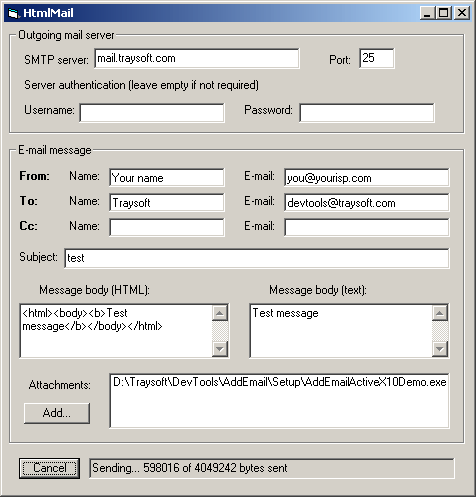
AddEmail fires progress events when it sends emails in the background, so your application always knows how many bytes were sent and how many bytes left. This feature is especially useful when sending large messages and allows you to implement user-friendly interface with mail progress indicator, Cancel button etc.
Download AddEmail ActiveX Demo
AddEmail works with all development environments that support COM objects, ActiveX or OCX controls, such as VB.NET 2002-2022, C# 2002-2022, ASP.NET, Visual Basic (VB5 and VB6), Visual C++, ASP, Access, Excel, Delphi, PowerBuilder, FoxPro, etc.
AddEmail supports all 64-bit and 32-bit versions of Windows including Windows 11, Windows 10, Windows 8, Windows Server 2003-2019, Windows 7, Windows Vista, Windows XP and Windows 2000.

AddEmail download includes AddEmail Help, AddEmail Manual and over 50 VB.NET, C#, ASP.NET, Visual Basic (VB6), ASP, Visual C++, Delphi, VBA (Access and Excel), JavaScript and VBScript samples.
Uninstall Instructions
To uninstall AddEmail, open Control Panel, select Uninstall a Program, click on AddEmail ActiveX in the list then select Uninstall. AddEmail will be removed from your computer.
Order AddEmail ActiveX
AddEmail ActiveX Enterprise
| 1 Developer License | $399 | Buy Now! |
|
5 Developer Licenses
(Get 5 licenses for the price of 3) |
$1,195 | Buy Now! |
|
Site License
(Unlimited developers at one street address) |
$3,995 | Buy Now! |
AddEmail ActiveX Professional
| 1 Developer License | $199 | Buy Now! |
|
5 Developer Licenses
(Get 5 licenses for the price of 3) |
$595 | Buy Now! |
|
Site License
(Unlimited developers at one street address) |
$1,995 | Buy Now! |
All prices are in US dollars.

If you are not satisfied with our product, we will give your money back.

All licenses include free updates for one year. After one year new versions are available for purchase at 50% discount. Please contact us to get an update.
| Feature | Professional | Enterprise |
|---|---|---|
| Text emails | ||
| HTML emails | ||
| Unlimited number of attachments | ||
| HTML emails with embedded images | ||
| Import HTML with images from disk | ||
| Multiple To, Cc and Bcc recipients | ||
| International characters | ||
| Full Unicode support | ||
| SMTP authentication | ||
| Secure Password Authentication (SPA) | ||
| Encrypted connections (SSL/TLS) | ||
| Non-blocking asynchronous sending | ||
| Progress indication events | ||
| Multi-threaded SMTP engine to send large number of emails quickly | ||
| Send multiple emails simultaneously | ||
| Send emails directly without using SMTP Server | ||
| AddEmail Help and AddEmail Manual included | ||
| Over 50 Visual Basic (VB6), VB.NET, C#, Visual C++, ASP, ASP.NET, Delphi, PowerBuilder, VBA (Access and Excel), JavaScript and VBScript samples included | ||
| Free run-time distribution | ||
| Price (per developer) | $199 | $399 |
Licensing Information

AddEmail ActiveX is licensed per developer. A license is required for each developer who will use AddEmail ActiveX. You are only required to purchase a license for each developer who develops or maintains the portions of your applications which use AddEmail ActiveX. Site license allows an unlimited number of developers to use AddEmail ActiveX at one physical street address.

The AddEmail license agreement allows you to embed and distribute AddEmail ActiveX within your application, royalty free. Once you purchase a license for each developer, you may distribute AddEmail ActiveX with your application without any additional fees.
Authorized Resellers

Support
Your AddEmail purchase includes lifetime free email support. Please visit AddEmail support page to submit a support request.